
Linux Mint 22.3, codenamed “Zena”, is now available, marking the final release in the Linux Mint 22.x line.
This version is based on Ubuntu 24.04.3 LTS and is intended to carry users comfortably through the remainder of the current LTS cycle. Out of the box, it runs on the Linux 6.14 kernel, with an Ubuntu HWE stack offering Linux 6.17 expected to follow soon.
While Mint 22.3 has access to most of Ubuntu’s “Noble” software repositories, the distribution continues to avoid Snap packages by default. As a result, applications like Firefox and Thunderbird are provided as classic .deb packages instead (Snap support can still be enabled manually for those who want it).
Below is a closer look at what’s new in this release.
What’s New in Linux Mint 22.3
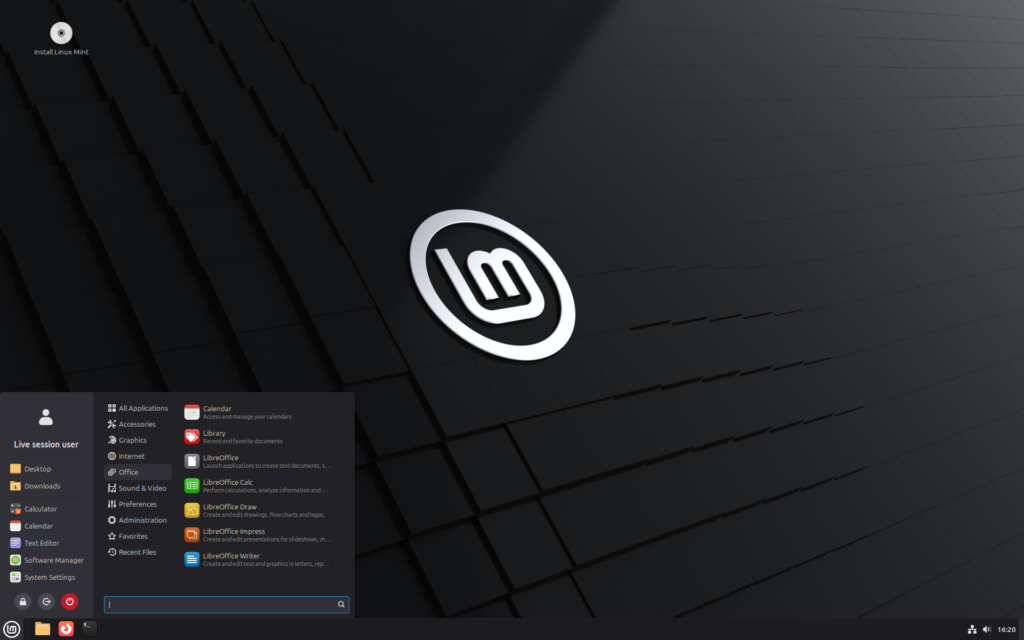
A Refreshed Mint Menu
One of the most noticeable updates is a redesigned application menu. The change has sparked mixed reactions, but it feels more like a careful evolution than a radical overhaul—very much in line with Mint’s conservative design philosophy.
Functionally, the menu behaves as it always has, but users now get more control over how it looks and works. You can tweak the layout by moving the search field, hiding application descriptions, resizing and recoloring category icons, or disabling file search altogether.
This isn’t the sort of update that will make or break a distro choice, but it does reflect Mint’s focus on usability: changes are guided by how people actually use the desktop, not by chasing trends. And with plenty of configuration options, users who prefer the old look can easily dial things back.
More Flexible Fractional Scaling
Fractional scaling sees a small but meaningful improvement. When enabled, users can now choose between scaling up or scaling down.
On a single display the difference may be subtle, but it’s particularly useful in multi-monitor setups where screens don’t share the same DPI. Scaling down prioritizes visual sharpness by rendering at higher resolutions, while scaling up trades some crispness for better performance by rendering lower and enlarging the result.
Which option feels better will depend on your hardware, so it’s worth experimenting.
Cinnamon 6.6.4 Enhancements
Linux Mint 22.3 ships with Cinnamon 6.6.4, which brings a collection of refinements rather than headline-grabbing changes. Individually small, these tweaks add up to a noticeably smoother day-to-day experience.
Language and keyboard handling have been significantly improved, including in Cinnamon’s still-experimental Wayland session. Traditional XKB layouts and IBus input methods are now grouped together in both the keyboard settings and the language switcher applet, making it much easier to switch input methods—even when using options like Mozc.
A new built-in on-screen keyboard also makes its debut, with support for switching between configured layouts.
Additional Cinnamon improvements include:
- Notification badges on app icons to indicate unread alerts
- Window tiling controls consolidated into a dedicated section
- An Alt+Tab option to show only windows from the active monitor
- Optional hot corner activation while apps are fullscreen
- A new Thunderbolt settings module
- An “Always On” mode for Night Light
Panel applets have also been polished. The Network applet can now manage multiple VPN connections at once, the Calendar refreshes remote entries when opened, and the Sound applet no longer drops album art after volume changes.
Workspace navigation gets attention too: the Cornerbar applet supports mouse-wheel workspace switching, and the Workspace Switcher can display icons for open apps on each workspace.
Overall, Linux Mint 22.3 focuses on refinement rather than reinvention—closing out the 22 series with a solid, well-rounded update that prioritizes stability, usability, and long-term reliability.